v1.0Windows 10/11

See every packet.

every connection named to its process · 120+ protocols identified · 30+ deep-inspected on the wire

Control every connection.

120+protocols identified · 30+ deep-inspected
0telemetry — verify it on the wire
6ways to enforce — system-level, even on Free
$0Free forever — real enforcement, no account

A firewall that understands your traffic.

A powerful Windows host firewall: per-app enforcement with a full rule engine, 120+ protocols identified across the stack (30+ deep-inspected), every connection named to its process, and verdicts you can trust.

Enforce by app — and by every rule

Allow or block per executable at the system level — then go further: IP and CIDR (v4 + v6), port and protocol, inbound, DNS-layer domains, time-window and country rules. On every edition, including Free — and your rules keep working after the app is closed or the PC restarts.

Know what’s really on the wire

Ferrite identifies 120+ application protocols — TLS SNI, QUIC, HTTP, SSH, SMB, WireGuard and more — and deep-inspects 30+, reading TLS/HTTP fingerprints (JA3 · JA4) straight off the wire. An app hiding on port 443 is still identified for what it actually is.

Every connection has a name

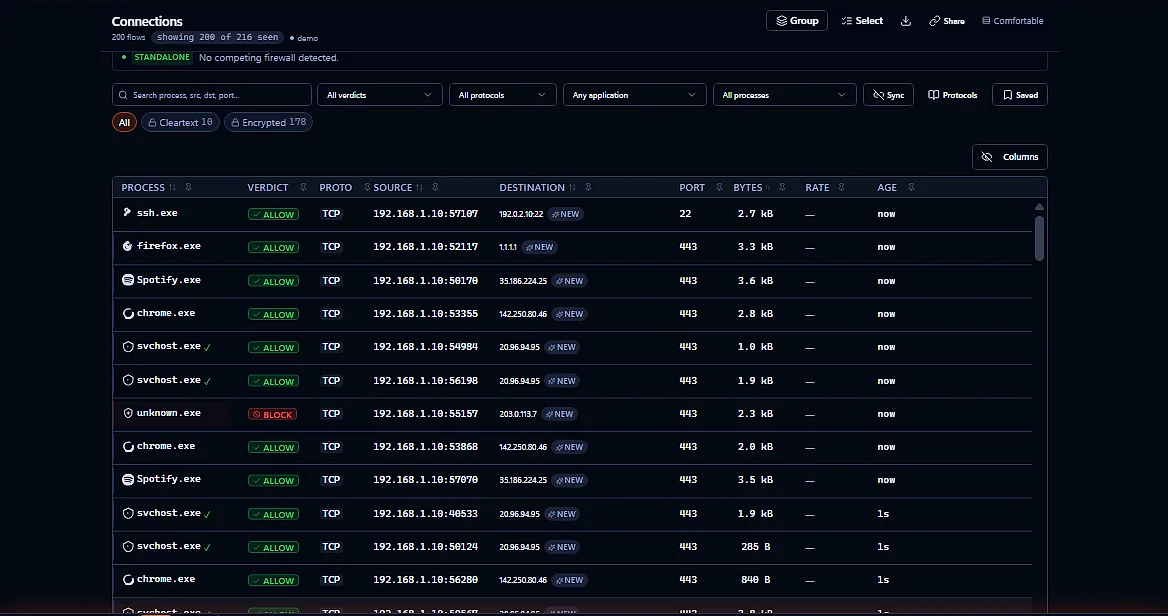
Ferrite names every flow to the executable that opened it, with the destination, the protocol, and a live verdict — so every connection is something you recognize, not a bare port and IP. It even surfaces your browser’s DNS-over-HTTPS bypass and shows you exactly which process did it.

Verdicts you can trust

Ferrite badges what it does and doesn’t enforce — a rule with nothing to act on says so, instead of glowing green and doing nothing. And it sends zero telemetry: the processes you run and the hosts you reach never leave your machine.

See it. Name it. Enforce it.

Every connection your machine makes runs one three-step pass — seen, named, then enforced at the system level. Seeing needs no admin; a single elevation arms enforcement.

01

See

The instant a socket opens, Ferrite catches the flow — every process, live, nothing sampled.

Real-time · no admin needed
02

Name

It resolves each flow to its app, destination, protocol and DNS, and identifies it against 120+ protocols — no more nameless IPs.

App · destination · protocol · DNS
03

Enforce

Your rules apply system-wide — by app, IP, port, domain, time or country — and hold after the app closes or the PC reboots.

System-level · per-app · persistent

Real system-level enforcement — even on Free.

Everything below blocks at the system level, in every edition including Free — per app, and by a full set of rule types. No add-on, no asterisks.

CapabilityEvery edition · incl. Free
Per-app allow / block Enforces
Destination IP / CIDR · IPv4 + IPv6 Enforces
Port / range · TCP + UDP Enforces
Inbound rules · boot-time persistence Enforces
DNS-layer domain blocking Enforces
Time-window rules · after-hours / weekends Enforces
Country / geo rules · outbound Enforces (most)

Country blocks expand to their IP-block set and install as system-level filters — proven on hardware. The 16 largest IP allocators — including the US, UK and Germany — exceed the filter budget, so Ferrite flags them “not enforced” rather than faking a green check.

Everything your PC is doing, named and blockable.

Real capabilities, shipped today — not a roadmap.

Demo traffic — not your dataFerrite's Connections screen: a live-style table of flows, each resolved to its process, protocol, source, destination, and allow/block verdict
Captured from Ferrite running on synthetic demo traffic, not a live user’s machine — the layout and verdict logic are real, the flows shown are not.
Connections

Every flow has a name

Every connection resolved to its owning process, protocol, and verdict — not just an IP and a port.

Dashboard

Your protection, live

Throughput, active connections, and protection state, updated in real time.

DNS

DoH bypass, caught

Encrypted DNS bypass flagged the moment it happens — active blocking on Pro.

Events

Every decision, logged

Every allow and block, timestamped — replay exactly what happened, and when.

Geo lookups that phone home

Where it's really talking

Every destination resolved to country and ASN, entirely offline.

Enforcement

A rule for everything

Allow or block by app, IP/CIDR, port, domain, time-window, or country — enforced at the system level.

Catches the bypass your browser ships on.

Chrome, Firefox and Edge turn on encrypted DNS (DNS-over-HTTPS) by default and quietly route around the resolver you chose. Ferrite flags every attempt — the process, and exactly where it went — in every edition, on by default, and blocks it with deep inspection on Pro.

  • DNS-bypass detection — every edition (active blocking on Pro)
  • 10 secure-DNS providers built in · DoH / DoT
  • Tracker & domain blocklist — 100 on Free, unlimited on Pro
  • Offline GeoIP / ASN — no lookups phone home
Learn exactly how this works →
Every edition · on by default
Chosen resolver DoH bypass — caught

Free protects you. Pro is the full instrument.

Free is genuinely useful — real system-level enforcement, real visibility, no account. Pro adds the deep-analysis stack for people who want to take connections apart.

Deep packet inspection Pro

Ferrite identifies 120+ protocols and deep-inspects 30+ — TLS SNI, QUIC, HTTP, SSH, SMB, WireGuard — with TLS/HTTP fingerprints (JA3 · JA4 · JA4H) read off the wire, so “unknown.exe → some IP” becomes a named, classified connection.

Deep inspection reads the payload, not just the port — so an app hiding on 443 is still classified for what it actually is.

Forensics & 90-day history Pro

Run real SQL (DuckDB) over live traffic and up to 90 days of retained logs, or scrub the forensics timeline to replay exactly what happened, and when.

A dark 3D globe with glowing connection arcs fanning out from a home point to destinations worldwide

3D globe & graph Pro

Watch flows on a live 3D globe and network graph, rolled up by ASN and country — resolved entirely on your machine, so no lookups ever phone home.

Unlimited rules & profiles Pro

Drop the Free 25-rule cap. Build, import and export unlimited rules, and switch Permissive / Balanced / Strict postures in one click.

Post-quantum signed policy Pro

Ferrite signs your rule set with ML-DSA-65 (FIPS 204) and verifies it on every load — tamper the file on disk and the engine refuses to enforce it.

Real protection is free. Pro is the full instrument.

System-level protection is free, forever, no account. Pro is CA$99/yr per device (or CA$9.99/mo) with a 3-day trial, no card. Enterprise is a separate product for fleets.

Free
$0forever
No account required

Real protection for everyone — system-level enforcement, no account.

Download free
  • System-level per-app blocking — up to 25 rules
  • Per-process connection visibility
  • DNS-bypass detection
  • Secure DNS · 100-domain blocklist · 3 profiles
  • Offline GeoIP / ASN · live dashboard
Enterprise
Let’s talk
Separate product · per-seat licensing

Fleet management for teams. A Pro key does not unlock it.

Contact sales
  • Everything in Pro, plus:
  • Centralized policy & SIEM forwarding
  • Fleet rollout · SSO / SCIM (roadmap)
  • Priority support & onboarding
Platform
Windows 10 / 11 · 64-bit
Coexists with
Windows Defender Firewall, Portmaster & GlassWire — runs alongside them
Built in
Rust · zero telemetry · SHA-256 published · minisign auto-updates
Roadmap
macOS (system extension) · Linux (eBPF / TC)

Every feature, side by side.

FeatureFreeProEnterprise
Core visibility
Per-process connection visibility
Protocols identifiedTCP · UDP · ICMP · DNS120+ · 30+ deep-inspected120+ · 30+ deep-inspected
Offline GeoIP / ASN
Live dashboardCore chartsFull + Pro widgetsFull
DNS bypass detection
Enforcement · system-level (app · IP · port · domain · time · geo)
Per-app allow / block
IP / CIDR (v4+v6), port / range, TCP / UDP, inbound
Boot-time persistence
DNS-layer domain blocking
Time-window rules
Country / geo rulesMost countriesMost countriesMost countries
Firewall rulesUp to 25UnlimitedUnlimited
Domain blocklist100 entriesUnlimitedUnlimited
Profiles (Permissive / Balanced / Strict)
Rule export / import (.frules)
Deep analysis
Deep packet inspection (30+ protocols · TLS/QUIC/SSH/SMB…)
Post-quantum signed policy (ML-DSA-65, FIPS 204)
Custom secure-DNS provider (DoH / DoT)
Connection log retention90 daysConfigurable
SQL analytics over logs (DuckDB)
Forensics timeline scrubber
3D globe · network graph · workspace canvas
Teams & fleet
SIEM forwarding & webhooks
Fleet management across endpointsRoadmap
SSO / SCIM provisioningRoadmap
Licensing & platform
LicensingNo accountPer devicePer seat
SupportCommunityPriority emailPriority + onboarding
Windows 10 / 11 (64-bit)
macOSRoadmapRoadmapRoadmap
Linux (eBPF / TC)RoadmapRoadmapRoadmap

Deep packet inspection reads the payload to classify a flow even when the port lies. Country / geo rules enforce at the system level — a country expands to its IP-block set as system-level filters, proven on hardware; the 16 largest IP allocators exceed the filter budget and are badged “not enforced” rather than faked.

The honest answers.

Is the Free tier actually useful, or just a teaser?

Genuinely useful. Free gives you real system-level per-app enforcement, DNS and tracker blocking, per-process visibility, and secure DNS on every connection. The 25-rule cap is the only meaningful limit. Pro adds the deep-analysis stack; it doesn’t unlock “protection” you were missing on Free.

What can Ferrite enforce?

At the system level, Ferrite can allow or block by app, by IP or CIDR (v4 + v6), by port and protocol, by domain (DNS-layer), by time-window, and by country — inbound and outbound. Rules persist across reboots and keep working even when the app is closed. Free covers up to 25 rules; Pro is unlimited.

Why is Pro priced per device?

Ferrite is a host firewall — it protects the machine it’s installed on. Pricing per device keeps that honest and simple: each machine you want the full instrument on is one Pro device. Running it on several? Each machine gets its own key, or ask about Enterprise volume pricing.

Is there a free trial of Pro?

Yes — 3 days, no credit card. Start it from the License panel inside the app. When the trial ends, Pro features revert to Free; your rules and settings stay exactly as they were.

How do I activate Pro after I buy it?

Checkout runs through Polar, our merchant of record, which emails you a FERRITE_ license key (also visible in your Polar customer portal). Install Ferrite, open the License panel, and paste the key — the app validates it with Polar and unlocks Pro on that device. One device per key: deactivating inside the app, or from your Polar portal, frees the key so you can activate it on a new machine.

Can I cancel Pro, and what happens if I do?

Yes, any time. Your subscription stays active through the period you already paid for, then the device reverts to Free automatically — no auto-charge past that point, and your rules and settings aren’t touched.

What's the difference between Pro and Enterprise?

Enterprise is a separate product for teams managing many machines: SIEM forwarding, fleet management, and SSO/SCIM provisioning, licensed per seat. A Pro license key does not unlock Enterprise features.

Does Ferrite phone home?

No telemetry, at all — there’s nothing to opt out of. The only network calls Ferrite makes are the signed update check and the things you explicitly configure: your chosen secure-DNS resolvers, and Enterprise SIEM/webhook forwarding if you turn it on. Connection-shaped data never leaves your machine.

How long does Ferrite keep connection logs?

Locally only — logs never leave your machine (see above). Free doesn’t retain history beyond the live dashboard; Pro keeps 90 days for the forensics timeline and SQL analytics; Enterprise retention is configurable.

Which platforms are supported?

Windows 10/11 (64-bit) today. macOS (system extension) and Linux (eBPF/TC) are on the roadmap; Pro buyers get beta access when each platform enters beta.

Ready to see — and control — every connection?

Free forever. Real system-level enforcement. Zero telemetry.